Wildlife monitoring and biodiversity data platform — overview, features, and a user guide.
Overview
SPARROW is a wildlife monitoring and biodiversity data platform designed to help research teams manage camera-trap and bioacoustic surveys from data collection through to reporting and export. It combines automated wildlife detection, species identification, review workflows, annotation tools, and biodiversity reporting within a single collaborative workspace. The platform is built for both traditional camera-trap surveys and near real-time wildlife monitoring projects using connected field devices.
Images, audio and sensor data can arrive from multiple sources including wireless GSM and 4G camera traps, email-connected cameras, FTPS uploads, live RTMPS video streams from drones, manual uploads, satellite and SPARROW field devices. As new data arrives, SPARROW automatically processes it using AI models that detect animals and optionally identify species. Results are organised into project workspaces where researchers can review detections, correct labels, remove false positives, and manage survey data collaboratively.
SPARROW is designed for conservation organisations, universities, environmental agencies, protected areas, and ecological research teams working with large volumes of biodiversity data. Projects support multiple users with role-based permissions, allowing field staff, reviewers, analysts, and project managers to work together within the same survey. Each project is private by default, only the account that created it and the collaborators the explicitly invide can view or work on the data.
Alongside image review and annotation, SPARROW includes tools for deployment management, biodiversity reporting, standards-compliant data export, notifications, and long-term project organisation. Camera deployment metadata follows the Camtrap DP biodiversity standard, helping projects remain publication-ready and simplifying future export to biodiversity archives such as GBIF.
Create a new project — upload images and add your camera deployments.
Features
Topics 8 and 9 cover separate development work: private model training and Sparrow Data. Select a screenshot to enlarge it.
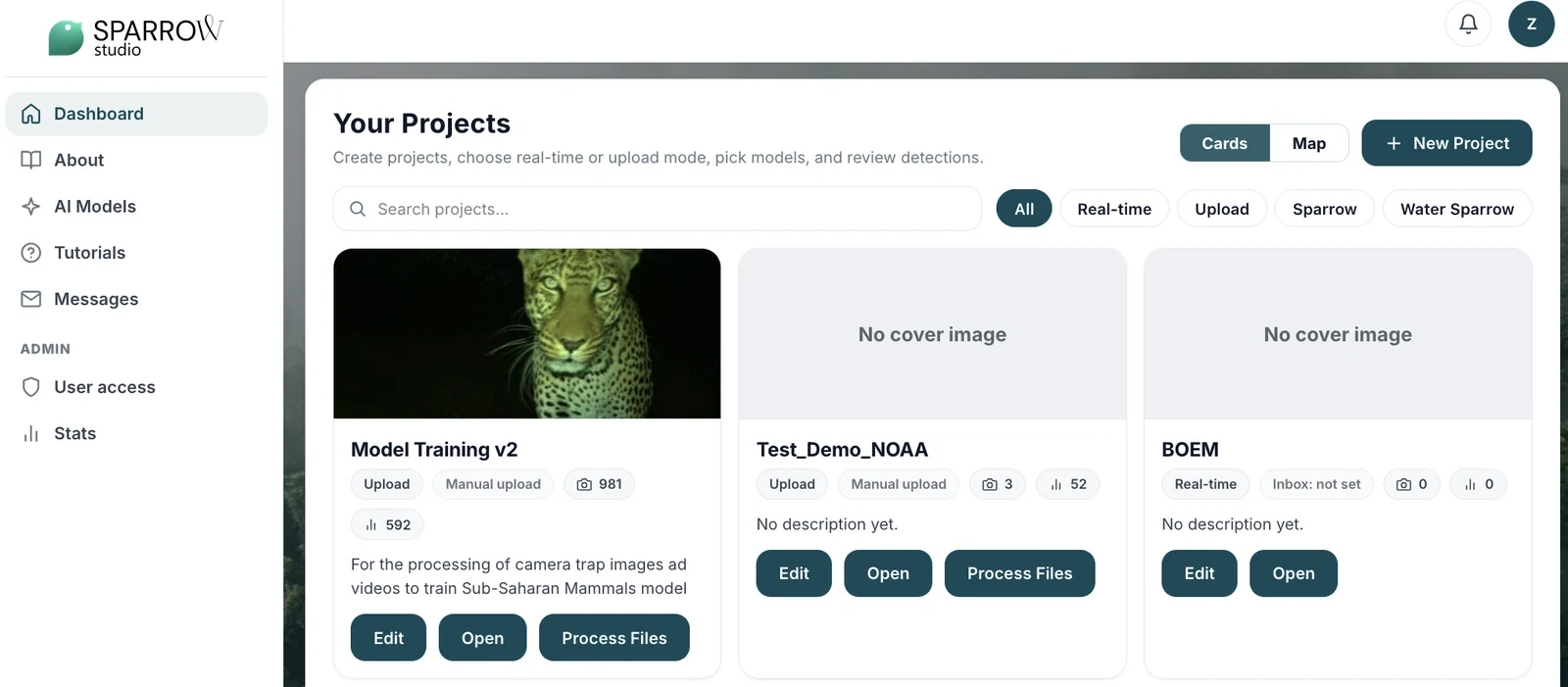
Project dashboard.
1. Project management
Create named projects for a study's observations, cameras and deployments. Project owners can add existing active Studio users as viewers, editors or managers, with different permissions to view data, edit content or manage membership.
Project-type choices.
2. Data ingestion
Batch projects accept supported image and audio files and MP4 video. Compatible cameras can send images through configured email or secure file-transfer connections. Supported field devices have their own upload routes. Intake options depend on the project type and equipment.
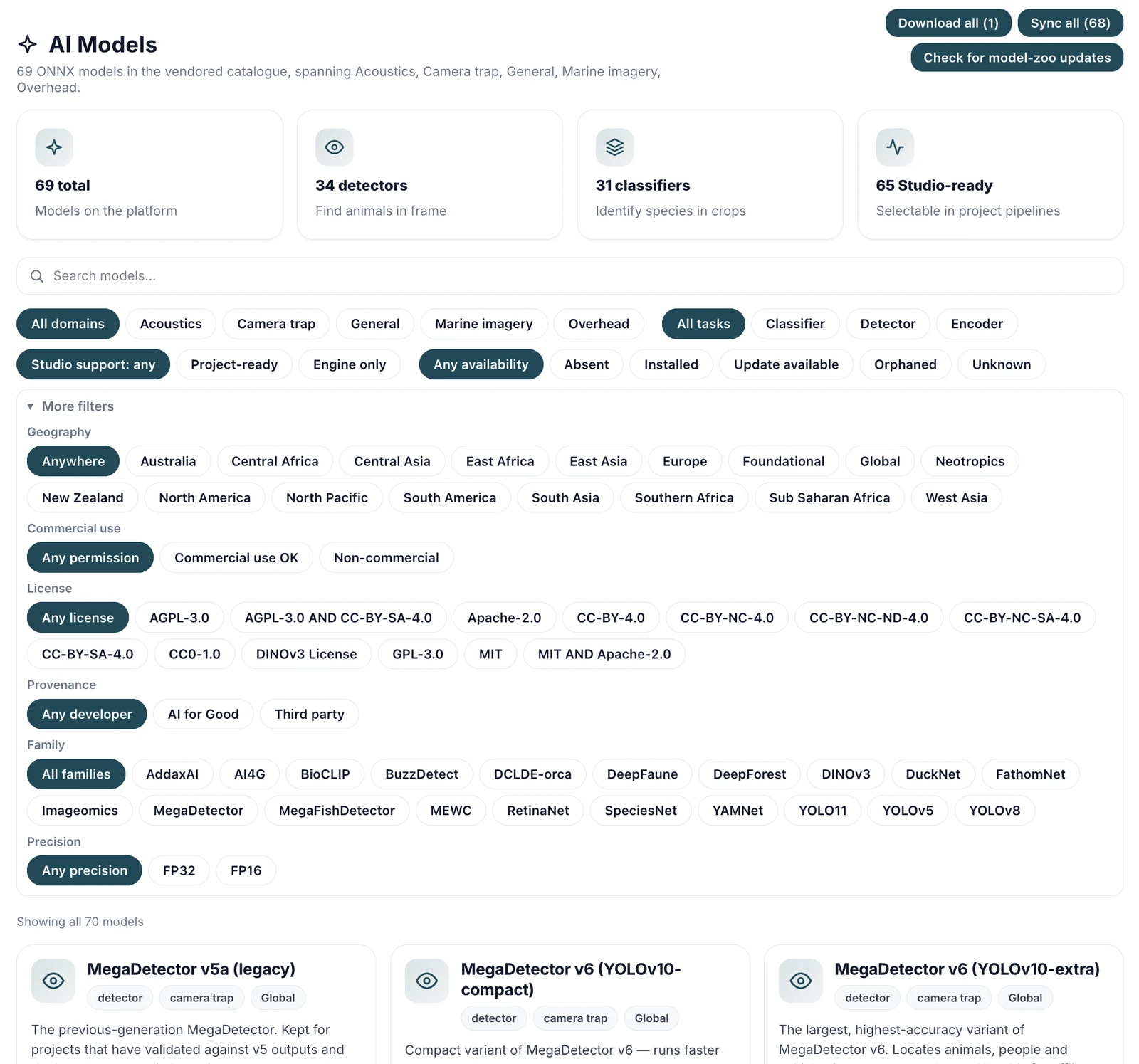
Model catalogue.
3. Model Zoo
The Model Zoo lists model tasks and licences. Project choices are limited to compatible models installed on your deployment. For camera-trap images, a detector can find animals and a compatible classifier can identify their species. Some detectors identify species without a separate classifier.
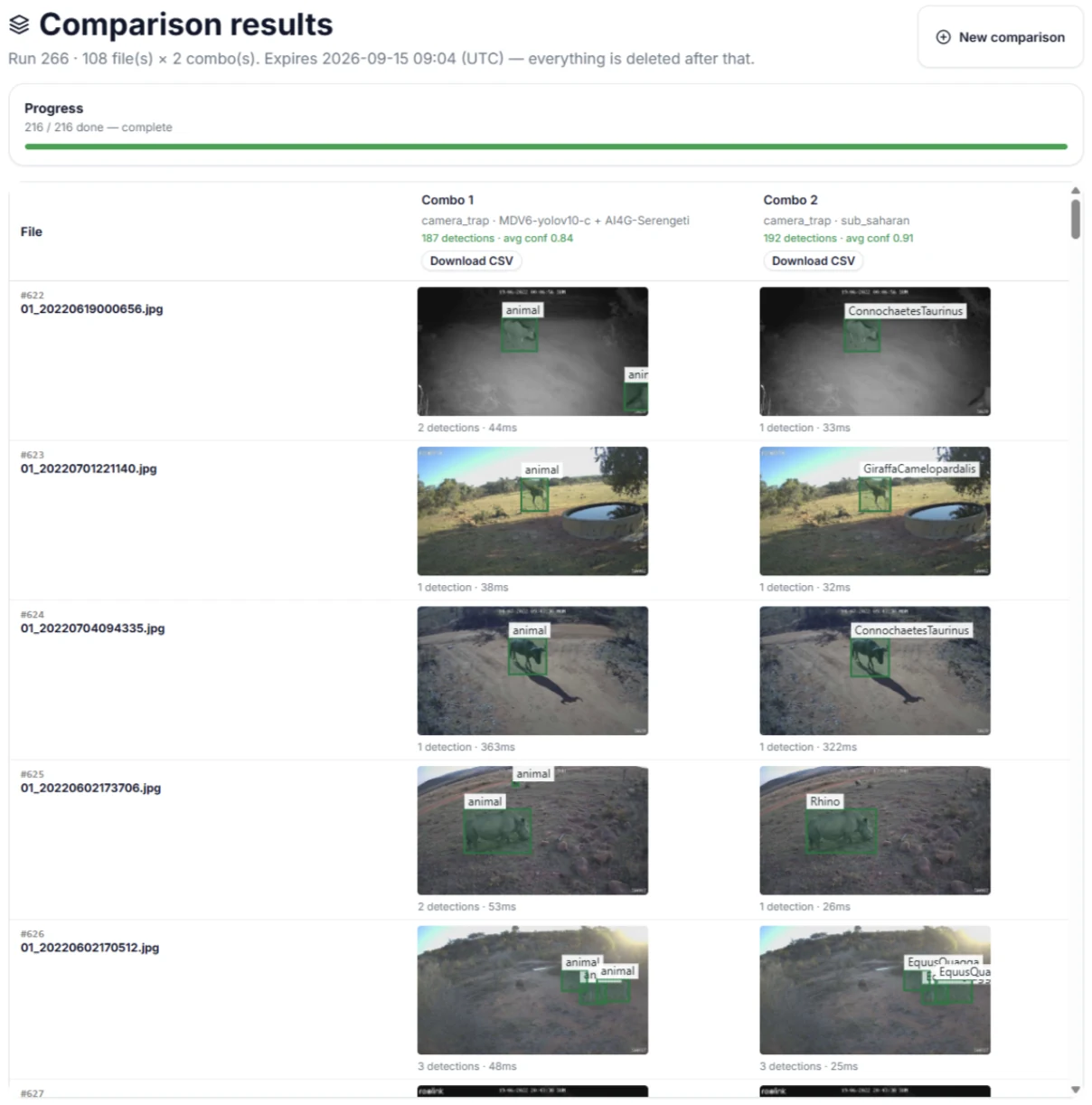
Side-by-side model results.
4. Playground (Try model)
Use Try model to compare compatible models on sample images or audio, not video. Inspect results side by side and download a comma-separated values (CSV) table for each choice. Results are temporary and separate from projects; comparisons alone do not measure model accuracy.
Image review and annotation.
5. Prediction review and annotation
Review predictions and edit labels, detection boxes and notes. Record review status and use camera, date or species filters to find observations. Controls vary by data type. A model's confidence score is not an accuracy measurement.
Detection CSV export.
6. Prediction outputs
For project detection records, choose CSV columns and filters, then preview the export. Some workflows provide a biodiversity PDF or specialised audio downloads. Formats and fields vary by workflow.
7. Data types
Data
Workflow
Camera-trap images and video
Review image predictions or MP4 video with detections on sampled frames, not every original frame.
Bioacoustics
Listen to recordings, inspect spectrograms showing sound over time, and review detected time regions. Batch uploads and device recordings use different pages.
GPS tracking
View dated positions and tracking histories on a project map when a tracking source is configured.
Aerial surveys and drone streams
Use compatible overhead-image models. Supported streaming setups record video segments for processing; controller compatibility varies.
8. Model fine-tuning and versioning
In development
Private model training uses a separate development build and is disabled by default. It trains a small classifier from human-confirmed image labels using features from an unchanged image model. The build saves model versions; an authorised user selects a private version for the project. Full-model fine-tuning, detector training and public model publication remain future work.
Automatic model updates from review feedback (active learning) remain planned.
Both screenshots are simulations, including the scores, automatic acceptance and model-activation controls.
Simulated training progress and learning curves.Simulated comparison scores and private-model selection.
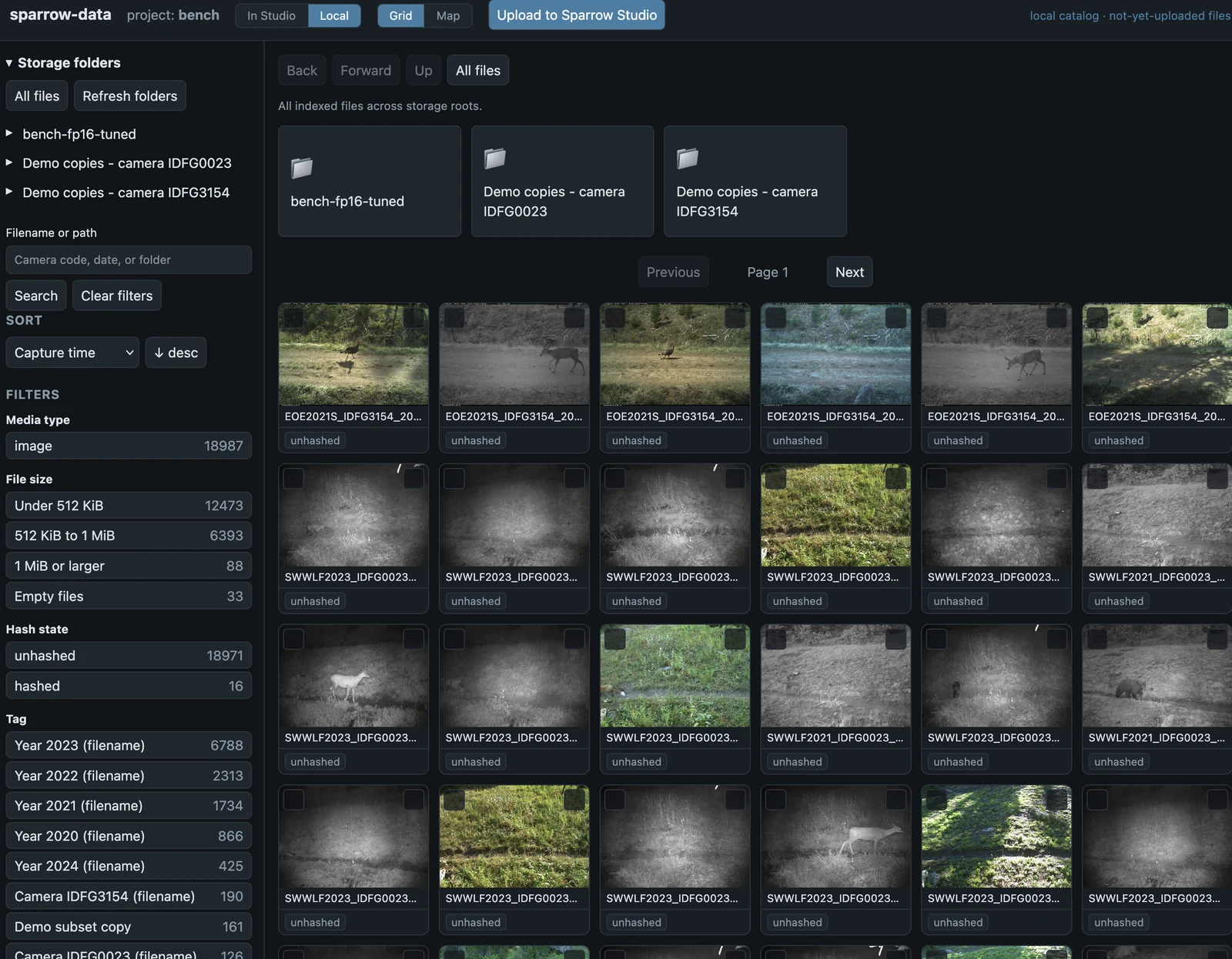
9. Sparrow Data
Separate application, in development
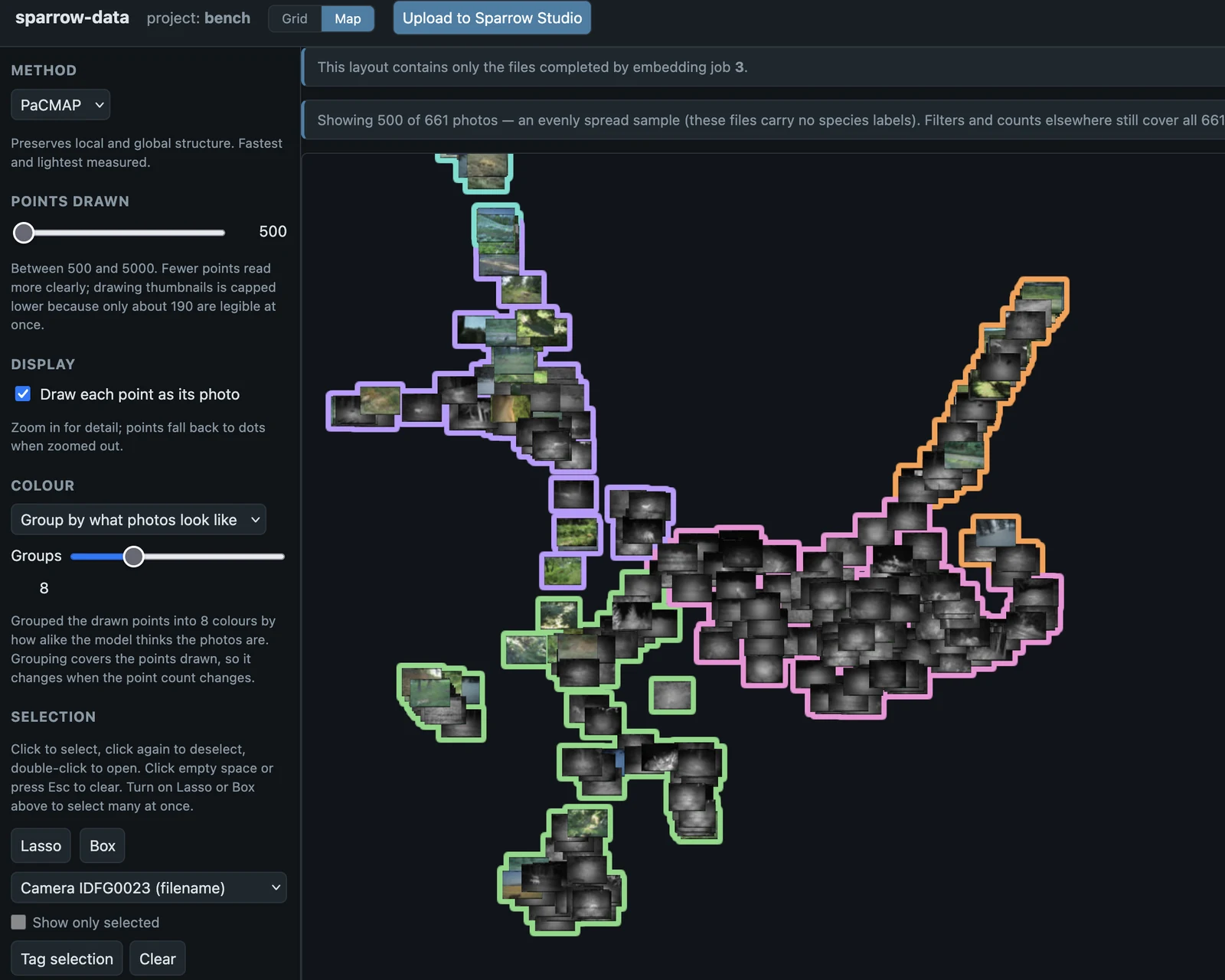
Browse folders on the computer running Sparrow Data or mounted network storage. Add tags and save filtered views. With photo-similarity processing configured, find related images and explore a map grouped by appearance, not location.
The pictured Studio upload button is a preview and does not send files. The upload connection to Studio is under development. Dataset version history and automatic updates flowing back from Studio are unfinished.
Folder browser in the Sparrow Data development app.Photos grouped by appearance, not geographic location.
Supported Hardware
SPARROW integrates with a range of field hardware. The tables below list the devices that have been tested end-to-end against the platform — other models from the same manufacturers often work without changes, but the entries below are the reference deployments.
Camera traps
SPARROW is camera-agnostic. Camera traps deliver images either by uploading directly over FTPS or by emailing them to a monitored inbox. SPARROW supports both ingestion paths.
Tested Camera
FTPS
SMTP (email)
Reolink Ranger Keen
✓
✓
Reolink Go
✓
✓
Reconyx HS2XC HyperFire 2 Cellular
—
✓
GPS trackers
GPS trackers can be attached to any project as an optional add-on. SPARROW polls the tracking provider periodically and stores the full position history alongside the project's image and audio data.
Device
Integration
Notes
GSat Solar Enhanced
GSatTrack JWT API
Add via the project edit page; polled every 5 minutes; full position history retained and rendered as colour-coded polylines on the tracking map
Drones (RTMPS live video)
Drones can publish live video directly into SPARROW over RTMPS (encrypted RTMP). The platform records the incoming stream into short segments and feeds each one through the same video processing pipeline as a manually uploaded clip — frames are extracted, AI inference runs on every frame, and the results appear in the project workspace within a minute or two of the segment closing.
Tested aircraft / controller
Streams to SPARROW
DJI drones with the DJI RC Pro 2 controller
✓
Other drones and controllers sending data over RTMPS should be possible, we haven't tested them yet.
SPARROW field devices
SPARROW field devices run AI inference on the edge and upload pre-classified detections directly into the platform. Each device is provisioned with a one-time onboarding key that becomes its persistent API credential.
Device
Integration
Notes
SPARROW edge device
SPARROW REST API
Edge-classified images and audio plus device telemetry (battery, CPU temperature, Starlink link state); per-device settings managed from the dashboard
Water SPARROW
SPARROW REST API
Audio recordings plus water sensors (temperature, pH, conductivity, dissolved oxygen); per-device API key authentication
User Guide
Project types — choosing the right workflow
SPARROW supports several project types depending on how data will enter the platform.
Project type
Use this when…
realtime
Your camera sends images by email using GSM or 4G connectivity
realtime_ftp
Your camera uploads images directly using FTPS
batch
You upload images manually from your computer
drone RTMPS
Your drone streams live video directly to SPARROW using RTMPS (available on realtime, realtime_ftp, and batch projects)
sparrow
You are using a SPARROW edge device
water_sparrow
You are using a SPARROW water monitoring device with audio and sensor data
Different project types enable different ingestion pipelines and configuration options, but all projects use the same review, annotation, and reporting tools once data arrives in the workspace.
User roles and permissions
SPARROW supports role-based access control so multiple people can work within the same project safely and efficiently.
Role
Permissions
Owner
Full control of an individual project including deletion
Manager
Can manage project settings, deployments, pipelines, and members
Editor
Can review detections, annotate images, and manage records
Viewer
Read-only access to assigned projects
This structure allows field teams, analysts, reviewers, and stakeholders to collaborate while maintaining clear control over project settings and data management.
Creating a new project
To create a new project, select New Project from the dashboard and choose the workflow type that best matches your survey. Enter the project name, location, and description, then save the project.
Once the project has been created, additional configuration options appear depending on the selected workflow. For example, real-time projects can configure email or FTPS ingestion, while SPARROW device projects can register edge devices and monitoring hardware.
Projects can then be populated with camera deployments, team members, and upload pipelines before data collection begins.
Adding camera deployments
Camera deployments store the metadata associated with each field camera used in a survey. Each deployment includes a unique camera identifier along with optional biodiversity metadata such as deployment dates, habitat information, camera model, orientation, mounting height, water depth, feature type, bait use, and deployment notes.
This metadata becomes part of the long-term biodiversity dataset and is included in standards-compliant exports generated from the platform.
SPARROW supports both terrestrial and aquatic deployments, allowing projects to record either mounting height or water depth depending on the survey type.
Uploading images manually
Batch projects allow researchers to upload images directly from a computer using drag-and-drop uploads or full folder imports. Entire directory trees can be uploaded at once, making it easier to process large historical surveys.
SPARROW automatically detects duplicate images, so re-uploading the same folder is safe and will not create duplicate records within the project.
Large uploads are processed in the background and automatically added to the review workspace once analysis has completed.
Email-connected camera workflows
Real-time email projects are designed for GSM and 4G camera traps that send images by email directly from the field. After configuring the monitored inbox, SPARROW regularly checks for new messages and processes attached images automatically.
Camera names can be extracted from email subjects or sender information, helping images route into the correct deployment automatically. Once processed, detections appear in the workspace within minutes and can immediately trigger notifications or species alerts.
FTPS camera workflows
FTPS projects allow connected field cameras to upload images directly into SPARROW over a secure transfer connection. Project-specific credentials are generated from the dashboard and entered into the camera configuration.
Once configured, uploaded images are processed automatically and appear in the review workspace without requiring manual downloads or SD card collection from the field.
Drone live streaming (RTMPS)
Any project that runs the server-side video pipeline (realtime, realtime_ftp, batch) can also accept live video from a drone over RTMPS. On the project edit page, click Generate RTMPS key to issue a one-shot stream key — the dashboard displays the full URL template the operator enters into the drone controller.
SPARROW currently supports drone streaming through the DJI RC Pro 2 controller.
Each 30-second segment of the live stream is recorded, processed through the existing video pipeline, and surfaced in the workspace as a normal video clip with bounding boxes drawn on every classified frame.
Reviewing detections
The Workspace is the main review area used for validating detections and managing annotations. Each image is displayed alongside its detection boxes and species labels.
Selecting an image opens a larger review view where detections can be confirmed, corrected, deleted, or annotated. Filters help reviewers focus on specific species, cameras, deployments, or time periods, while batch tools speed up repetitive review tasks.
This workflow allows large camera-trap surveys to be reviewed efficiently by multiple team members.
Generating biodiversity reports
Projects can generate biodiversity reports directly from the project page. Reports summarise species detections, independent detection events, per-camera activity, and survey statistics across selected date ranges.
Generated reports are suitable for technical reporting, monitoring summaries, ecological analysis, and biodiversity record keeping.
Notifications and alerts
The notification system highlights important project activity directly within the dashboard. Users can open notifications to jump directly to new detections or reviewed records.
Projects can also configure species-specific email alerts to notify selected team members whenever target species are detected. This supports near real-time monitoring and rapid-response workflows for conservation projects.
Need more help?
For additional support, deployment guidance, or technical documentation, please refer to the project documentation or contact your SPARROW administrator.
Security & Privacy
SPARROW is hosted on Microsoft Azure. Every project is private by default: only the account that created it and the collaborators it has explicitly invited can view, download, or search the data inside.
Uploaded content — images, detections, audio, and deployment metadata — remains the property of the uploader and their nominated collaborators.